
The Review Collection widget is served via a dynamic URL.
This URL contains each partner’s unique “partner key” and a set of interchangeable parameters which determine exactly what will be displayed within the widget.
For example:
partnerId = Partner Key. This will be given to you by your Account Manager once you have signed the contract and Tripadvisor engineers have set up your widget. Each partner key is unique and holds hard coded configuration preferences – these will be agreed with your Account Manager before the setup is done (see section on Configuration Options).
lang = language. Changing this parameter will display the widget in the language of your choice (as long as it is enabled for your partner key, as per above).
See Appendix: Languages.
IMPORTANT: Please take note of the case sensitivity of language parameters (example en_UK)
locationId = Tripadvisor ID of the property you would like the guest to review. If you would like to call up the widget using your own internal IDs, please see section on Mapping: https://developer-tripadvisor.com/partner/mapping-individual-properties/
allowMobile=true = Optimisation for mobile devices. With this parameter, the widget will detect the user’s device and change the display accordingly to match their screen size. The parameter forceMobile=true can also be used for integrations that are only intended for mobile use (e.g. in-app review collection). This parameter forces the widget into the mobile version every time it is loaded.
Width
Recommended minimum width of iframe –
Desktop: 600px
Mobile: 306px (based on iPhone 5).
The widget does not have a border. If the iframe width is set to anything smaller than the values above, it may disrupt the layout (especially on mobile). Please make sure to test on multiple devices, or with a mobile emulator.
Height
To ensure all content within the widget is visible to the user, any of the following iframe height options are recommended:
1) Configure iframe to resize dynamically to fit the content within
2) Calculate maximum possible height of iframe in pixels (allowing for any error messaging in the widget – see section on Testing) and set iframe height to that value
3) Enable scroll bar in the iframe
It is mandatory to have a mobile optimised version of the landing page – with the allowMobile=true parameter included in the widget URL then it should correctly display the mobile optimised version of the widget. Since over 50% of emails are now opened on smartphones, your integration will not be approved by Tripadvisor to go live until we are satisfied that it is fully mobile optimised.
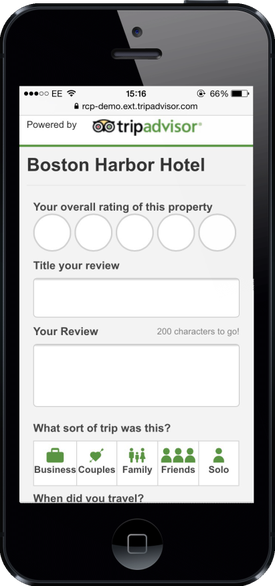
Here is a sample responsive landing page which accommodates for both the desktop and mobile versions of the widget: (best practice example - view the source of the page to see the code)
/assets/partner/static/rcp/good-mobile.html
You can make the review form little easier for your guests to fill in by pre-selecting their stay date and trip type (if known).
This is done simply by adding further parameters to the URL (please note case sensitivity):
|
stayMonth |
Used in combination with “stayYear” this parameter will pre-select on the user review form the date of the user’s stay at the property being reviewed. Month is 1-12, no leading zero
|
|
stayYear |
Year is the 4 digit year, with only the current and previous year being valid inputs (must be used in combination with “stayMonth”)
|
|
tripType |
Pre-populate the ‘What kind of trip was this?’ field. Will accept following parameter values: solo, family, business, friends, couples (all lowercase).
|
If your review collection implementation is part of a Guest Satisfaction Survey, you may also pre-fill fields in the Tripadvisor widget that the guest has already answered, by using the URL parameters in the following list. These are all optional and the widget will still work if you choose not to include them.They can be included in any order.
For all property types:
| overallRating |
Pre-populate the overall bubble rating, value range 1 – 5 with 5 being the best rating |
For hotels:
|
cleanlinessSubrating |
Pre-populate the Cleanliness sub rating, value range 1 – 5 with 5 being the best rating |
|
locationSubrating |
Pre-populate the Location sub rating, value range 1 – 5 with 5 being the best rating |
|
roomsSubrating |
Pre-populate the Rooms sub rating, value range 1 – 5 with 5 being the best rating |
|
serviceSubrating |
Pre-populate the Service sub rating, value range 1 – 5 with 5 being the best rating |
|
valueSubrating |
Pre-populate the Value sub rating, value range 1 – 5 with 5 being the best rating |
|
sleepqualitySubrating |
Pre-populate the Sleep Quality sub rating, value range 1 – 5 with 5 being the best rating |
For restaurants:
|
serviceSubrating |
Pre-populate the Service sub rating, value range 1 – 5 with 5 being the best rating |
|
foodSubrating |
Pre-populate the Food sub rating, value range 1 – 5 with 5 being the best rating |
|
valueSubrating |
Pre-populate the Value sub rating, value range 1 – 5 with 5 being the best rating |
|
atmosphereSubrating |
Pre-populate the Atmosphere sub rating, value range 1 – 5 with 5 being the best rating |
A URL with prefilled values may look something like this:
https://www.tripadvisor.com/WidgetEmbed-collectreview?stayMonth=4&stayYear=2015&overallRating=4&tripType=solo&valueSubrating=3&partnerId=XXXXXXXXXXXXXXXXXXXXXXXXXXXXXXX&display=true&locationId=89575&lang=en
**Note: these values must ONLY be prefilled if the guest has already answered them in a survey prior to the RCP widget - attempting to artificially boost ratings is considered fraud and may result in properties being penalised by our Content Integrity team**.
All guests completing a Tripadvisor review must provide their email address. Tripadvisor does not accept anonymous reviews. To make this process easier for your guests, it is possible to pre-fill their personal information on page 2 of the widget (so they have less to type and will be more likely to complete + submit their review).
The minimum information partner must pass through for this to work is the guest’s email address. It is also possible to pre-fill the following, if known:
- First name
- Last name
- Home city
All personal guest information sent to the Tripadvisor widget must be securely encrypted via a data string in the URL. Your Account Manager will provide you with a unique encryption key to make this work. See Appendix: Encoding for further information.
N.B. Tripadvisor will not capture any of the guest’s information until they agree with our terms and conditions, and click “submit”.
How does it work?
Step 1: Guest completes their review:
 |
Step 2: guest lands on personal details page
If the email address matches an existing Tripadvisor account, the review will be posted using those account details
 |
If the email address does not match an existing Tripadvisor account, a screen name will be auto-created for the guest, which they have the option to change before submitting.
(In this example, the guest’s home city is not known so is not passed into the widget. The guest must then type this themselves. The same would apply if the first/last names were not known).
 |
Step 3: After clicking “submit”, the guest receives a thank you message (or is redirected depending on configuration)
 |
If the above process is not set up by the partner, then the guest will need to fill in all of their own personal details on page 2 of the widget. This may lead to a higher drop-off rate and therefore have a detrimental effect on number of reviews submitted, so pre-filling the data is always the preferred option.