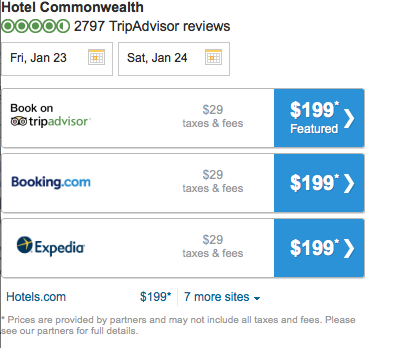
This document explains the content offered by the Tripadvisor Hotel Meta Search widget, configuration options and turn-up process. It details the pricing, availability, ratings, photos and reviews available for a particular property. This widget may be used with or without with the Geo Meta widget that allows users to see a list of hotels in a given city.
In the Hotel Meta Widget (a replica of the Meta section of the /HR page on TA live site), users can:
The following customization options are available for this widget; set by Tripadvisor.
| Option Name | Description |
| Default Button Color |
Color of the provider buttons in the default state. Default: #FFD05F |
| Hover Button Color | Color of the provider buttons in the hover state. Default: #FFB236 |
| Hover Row Color | Color of the provider row background in the hover state. Default: #FFECBD |
| Font Color | Provider row text color. Default: #000000 |
| Font Type | Provider Row text font. Default: Arial |
| Hide Taxes and Fees | Choose whether or not to hide the seperate taxes and fees display in applicable POS. |
| Show all Providers |
Show an "all providers" dropdown if they don't all fit into the initial display. Default: true |
| Hide Date Picker | Hide the date picker; prevents a user from changing dates. Default: false |
| Hide Hotel Name | Hides the name of the property |
| Hide Rating and Review Count | Hides bubble rating and review count for the property. |
| Disable Calendar Popout |
Disable the calendar automatically popping out on widget load |
| Show Hotel Name | Show the name of the hotel. Default: true |
| Width | Define the width of the content in the frame. |
Partner widgets are intended to be displayed in an iframe on the partner site. A sample iframe with a widget invocation might look like:
<iframe src=http://www.tripadvisor.com/WidgetEmbed-cdshotelmeta?display=true&
locationId=258705&partnerId=PARTNER_KEY&&checkIn=2015-10-28&checkOut=2015-10-28&display=true&lang=en_US¤cy=USD” Width=”400” height=”600”</iframe>
All widget URLs include the /WidgetEmbed Tripadvisor page followed by the key value for the widget being requested. This is followed by a question mark and the key/value pairs of URL parameters.
| Option Name | Description |
| locationID | Required. This will be the ID of the destination requested. This value can be either a TA ID, or a partner ID if TA has done a mapping of partner destination IDs to Tripadvisor IDs. |
| partnerID | Required. The partner key provided by Tripadvisor to allow partner access to widgets. |
| lang | Optional. The language in which to display the widget. |
| pageSize | Optional. You may choose how many Accomodations to show on a page. Default:10 |
| checkin | Optional. Set the Check In Date on the widget. Default: 1 night from today |
| checkout | Optional. Set the Check Out Date on th widget. Default: 2 nights from checkin |
| currency* | Optional. The currency shown to the user depends on their IP Country if it is not defined. |
*Currency is dependent on IP country.